Twitter to MP3
Download Twitter videos as MP3s with a single click
Download Twitter MP3 files instantly by copying the tweet URL and pasting it into our homepage - it's the quickest method available.
SSSTwitter enables you to download diverse Twitter content including videos, MP3 audio files, GIFs, and images. Our Twitter MP3 downloader receives regular updates to maintain optimal performance and reliability. Experience seamless Twitter MP3 content downloading at your fingertips.
Get access to the fastest Twitter video downloader with SSSTwitter, where you can select your preferred format and quality settings. Download videos directly in the format you need for maximum convenience and flexibility.
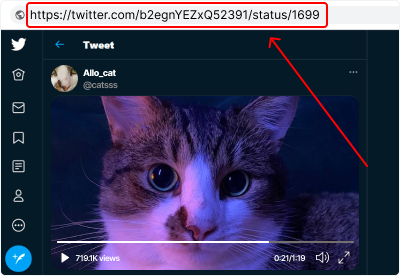
How to Download Twitter MP3s for Free
To extract MP3 audio from a tweet, start by copying the URL of the tweet containing the audio content you need. Navigate to our main page and paste the copied link into the designated field. Press the 'Download' button to begin processing your request.
Please ensure that:
-
You locate a tweet containing the audio content you wish to save as MP3 and copy its URL from either the browser address bar or using the share feature;
-
The copied URL is complete and includes the tweet ID (numerical sequence at the end);
-
The tweet contains video content with audio that you want to extract as an MP3 file.
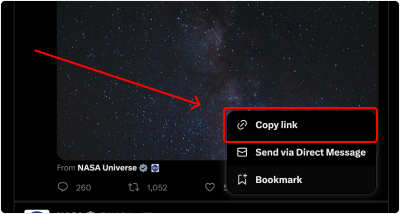
Alternative Method to Extract Audio from Twitter Videos
You can also copy the tweet URL directly from the share menu located next to the Follow button. This approach works just as well for downloading audio content from Twitter videos.
Follow these simple steps:
-
Navigate to the tweet containing the video or audio content;
-
Click the "Share" button and choose "Copy link";
-
Paste the copied URL into our website's input field.
How to save a Twitter MP3 on your iPhone?
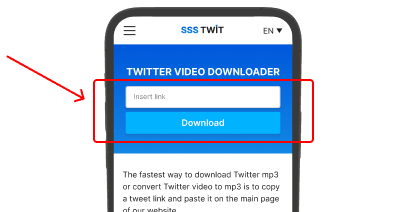
Follow these steps to download and enjoy your favorite Twitter MP3s with complete convenience.
Downloading a Twitter video as an MP3 to your iPhone with SSSTwitter is simple, fast, and secure. Just follow these instructions:
-
Open the tweet with the video and copy its link;
-
Visit SSSTwitter.online and paste the link into the input field;
-
Choose MP3 as the file format and click "Download". The MP3 will automatically download to your device.