Download Twitter Videos Now
Get your favorite Twitter videos in seconds with a simple paste
Download Twitter videos instantly by copying and pasting any tweet URL into our ssstwitter downloader - fast and dependable
Twitter ranks as the 12th most visited social media platform worldwide. Although it excels at sharing quick updates and multimedia content, downloading videos can be challenging since neither the website nor mobile applications offer built-in download capabilities.
SSSTwitter provides a dependable solution to download Twitter videos in your desired quality. Experience our video downloader now and enjoy the convenience for yourself.
Download Twitter Videos in Three Easy Steps
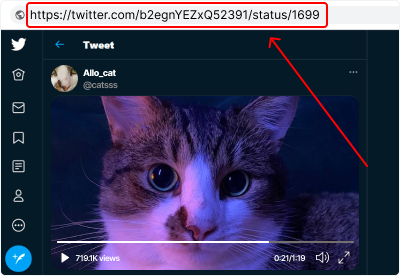
Copy the Tweet Link
Find the Twitter video you wish to download and copy its complete URL address.
Essential Guidelines:
-
Copy the link using your browser's address bar or the tweet's share option
-
Ensure the URL contains all necessary tweet identification numbers
-
Confirm the tweet includes video content before proceeding
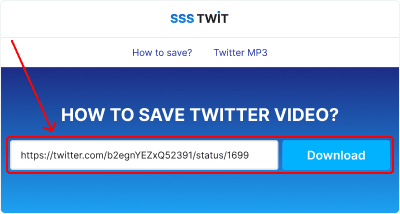
Paste the Link
Navigate to the ssstwit download tool. Enter the copied tweet URL into the designated field and click "Download".
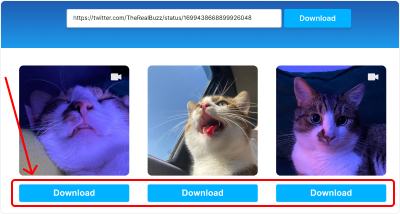
Download Your Content
Choose your desired video format and quality settings, then click "Download". Your file will be processed and ready within seconds.
Alternative Method for Twitter Video Downloads
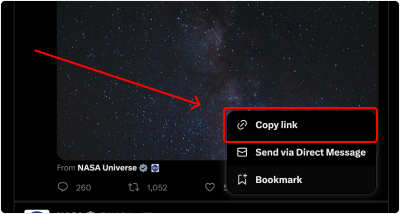
Obtain the tweet URL by using the share options menu positioned next to the Follow button.
Follow These Instructions:
-
Go to the tweet containing the video
-
Click "Share" located next to Follow and choose "Copy link"
-
Paste the copied link on our main page
Save Twitter Videos on iPhone: Step-by-Step Guide

Follow this straightforward process to download Twitter videos directly to your iPhone.
Quick Steps for iPhone Users:
-
Find your desired video tweet and copy its link
-
Visit ssstwit and insert the copied link
-
Choose your format and tap "Download" to save the video