Free Twitter Video Downloader
Download Twitter videos with one click - FREE HD Quality
Download Twitter Videos for Free - The #1 Twitter Video Downloader Online
SSSTwitter is the most popular free Twitter video downloader that lets you save videos, GIFs, and audio from Twitter tweets straight to your device — no registration required. Whether you're on Windows, Mac, Android, or iPhone, our online Twitter video downloader works across all devices and browsers without a hitch. Download Twitter videos in HD quality (1080p, 720p) for free with just one paste and a single click.
Trusted by over 10 million users worldwide, SSSTwitter makes it easy to download Twitter videos safely and quickly. Save as many Twitter videos as you want — no restrictions, no watermarks, no intrusive ads. Our Twitter video downloader processes your request instantly and delivers download links within seconds. Pick from multiple quality options including Full HD, or extract the audio and save it as an MP3 file directly from any Twitter video.
How to Download Twitter Videos - Step by Step Guide
Learning how to download Twitter videos has never been easier. Our free Twitter video downloader makes it simple to save videos from Twitter in just 3 simple steps. Whether you want to download a Twitter video in MP4 format, extract audio as MP3, or save animated GIFs, SSSTwitter handles it all instantly. No software installation, no browser extensions required - just paste the Twitter link and download. Works perfectly whether you're using a smartphone, tablet, or desktop computer.
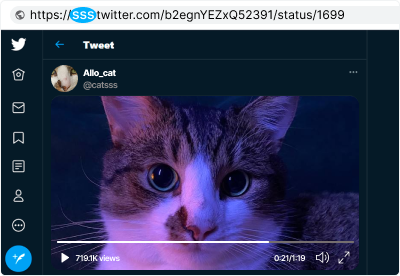
Simply paste your Twitter video link into the download box and press ENTER to begin the download process immediately!
Before you start downloading:
-
You must be viewing a single tweet page with video content.
-
The tweet must contain a video, GIF, or other media file.
-
Check the URL format examples below to ensure you're copying the correct link.
Valid Twitter video link examples:
-
https://twitter.com/Eminem/status/943590594491772928
-
https://mobile.twitter.com/Eminem/status/943590594491772928
Twitter Video Download Formats & Quality Options
Download Twitter videos in your preferred format and quality:
Important Notice: SSSTwitter does not host or store any copyrighted material. All Twitter video downloads are retrieved directly from Twitter's CDN (Content Delivery Network). We do not support unauthorized distribution of copyrighted content.
How to Download Twitter Videos - Complete Tutorial
Our Twitter video downloader works on all devices (Windows PC, Mac, Linux, Android, iPhone, iPad) without needing any software or app installation. Follow these three easy steps to start downloading Twitter videos for free:
-
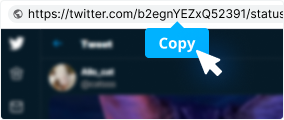
Step 1: Copy the Twitter Video Link
Find the Twitter video you want to download on Twitter.com or the Twitter mobile app. Click the share button and copy the tweet link, or copy the URL directly from your browser's address bar.
-

Step 2: Paste Link into SSSTwitter Downloader
Visit SSSTwitter.com, paste your Twitter video link into the download box at the top of the page, and then click the blue 'Download' button to process your request.
-

Step 3: Select Format and Save
Choose your preferred video format (MP4 in 1080p/720p/480p, MP3 audio, or GIF) and click 'Download'. Your Twitter video will save to your device in seconds.
Download Faster with SSSTwitter Chrome Extension
Install our free Chrome extension to download Twitter videos directly without leaving Twitter.com. Click the download button that appears on every Twitter video to save instantly!
Frequently Asked Questions About Downloading Twitter Videos
-
Can I download Twitter videos from private accounts?
No, our Twitter video downloader only works with publicly available tweets. We don't support downloading from private or protected accounts to respect user privacy. Only download content from public profiles where the creator has shared it openly.
-
What video formats are supported by the Twitter video downloader?
SSSTwitter supports multiple formats: MP4 (video downloads), MP3 (audio extraction), and GIF (animated GIFs). When you download a Twitter video, you can choose your preferred format and quality before saving.
-
Can I download Twitter videos on my mobile phone?
Yes! Our Twitter video downloader is fully optimized for mobile devices. Simply open SSSTwitter on your phone's browser (iOS Safari or Android Chrome), paste the Twitter link, and download. Works perfectly on all smartphones and tablets.
-
What quality options are available when I download Twitter videos?
When you download a Twitter video with SSSTwitter, you can choose from: 1080p (Full HD - best quality), 720p (HD), or 480p (Standard). Select the resolution that works best for your device and internet connection.
-
How do I download Twitter GIFs?
To download a Twitter GIF, paste the GIF link into our downloader, select the GIF format option, and click Download. The animated GIF will be converted and ready to save on your device in seconds.
-
How do I extract audio from Twitter videos (download as MP3)?
To extract audio from a Twitter video and save as MP3, paste the video link into SSSTwitter, then select "MP3" format instead of MP4 before downloading. Perfect for saving music videos, podcasts, and audio content from Twitter.
-
Where do my downloaded Twitter videos get saved?
Downloaded files automatically save to your device's default downloads folder. You can change the save location in your browser settings (Settings > Downloads > Change default location) or manually select where to save when prompted during download.
-
Is SSSTwitter safe and is downloading Twitter videos secure?
Yes, SSSTwitter is 100% safe. We use HTTPS encryption for all connections, never store your personal data, don't track your downloads, and don't require login or registration. All Twitter videos are retrieved directly from Twitter's servers, and we don't host any content.
-
Do you have a Chrome extension for downloading Twitter videos?
Yes! Get our free SSSTwitter Chrome extension to download Twitter videos faster. The extension adds a download button directly under every Twitter video, so you can save without leaving Twitter.com. Install from the Chrome Web Store.
-
Can I download videos from all Twitter profiles?
You can download media from any publicly accessible Twitter profile. We follow strict privacy and copyright standards, so private account content remains restricted. Always respect creators' rights and only download content you have permission to share.
-
Are there any limits on how many Twitter videos I can download?
No limits! SSSTwitter provides unlimited Twitter video downloads. Download as many videos as you need without restrictions, paywalls, or annoying ads. Save your favorite Twitter videos whenever you want, completely free.
-
How fast is the Twitter video downloader?
SSSTwitter processes most Twitter video downloads within seconds. After you paste the link and click Download, we immediately fetch the video from Twitter's servers and provide the download link. Speed depends on video size and your internet connection.
Privacy & Legal Information
Important Notice About Downloading Twitter Videos
SSSTwitter does not store, host, or retain any copyrighted material. All Twitter videos are downloaded directly from Twitter's CDN (Content Delivery Network) in real-time. We respect user privacy and copyright law. We do not support piracy or unauthorized distribution of copyrighted content.
Respect Copyright When Downloading: Only download Twitter videos and content that you have explicit permission to download. Do not download private content or copyrighted material without authorization from the copyright holder. Always respect the intellectual property rights of content creators.
Our Privacy Policy: SSSTwitter never collects, stores, or sells your personal information. We don't track your downloads, browsing history, or IP address. We don't require registration or login to use our service. Your privacy and security are our top priority.